
Converting cNGN to USDT is straightforward when you know the amount you want to swap and the rate you’ll get. Hyper FX gives you a quote based on your exact amount, without the need to search an order book or find a P2P counterparty.
In this article, we walk you through the process of how to complete a swap on Hyper FX.
What You Need Before You Start
Before using HyperFX, you’ll need:
- An EVM-compatible wallet, such as MetaMask, Trust Wallet, or a similar wallet.
- The token you want to swap is already in your wallet. In our test, this was USDT on the BNB Chain.
- A small amount of the native gas token for the network you’re using. On the BNB Chain, that means BNB. You’ll need it twice during the swap, as explained in Step 4.
HyperFX supports cross-chain swaps, meaning the tokens can be sent and received on different networks. In our test, USDT was sent from a wallet on BNB Chain, while cNGN arrived on Base.
So, before confirming a swap, check the network shown under each token. The network you receive the token on may be different from the network you started with.
Step-by-Step: Swapping USDT to cNGN (Tested)
Open the swap page at app.hyperfx.finance and make sure Market is selected, rather than Limit or Ramp.
Enter what you’re sending and what you want to receive. In our test, we entered 10 USDT on BNB Chain and selected cNGN on Base. The screen shows the available liquidity, which was over 1.4 billion cNGN in our test, along with the live exchange rate.
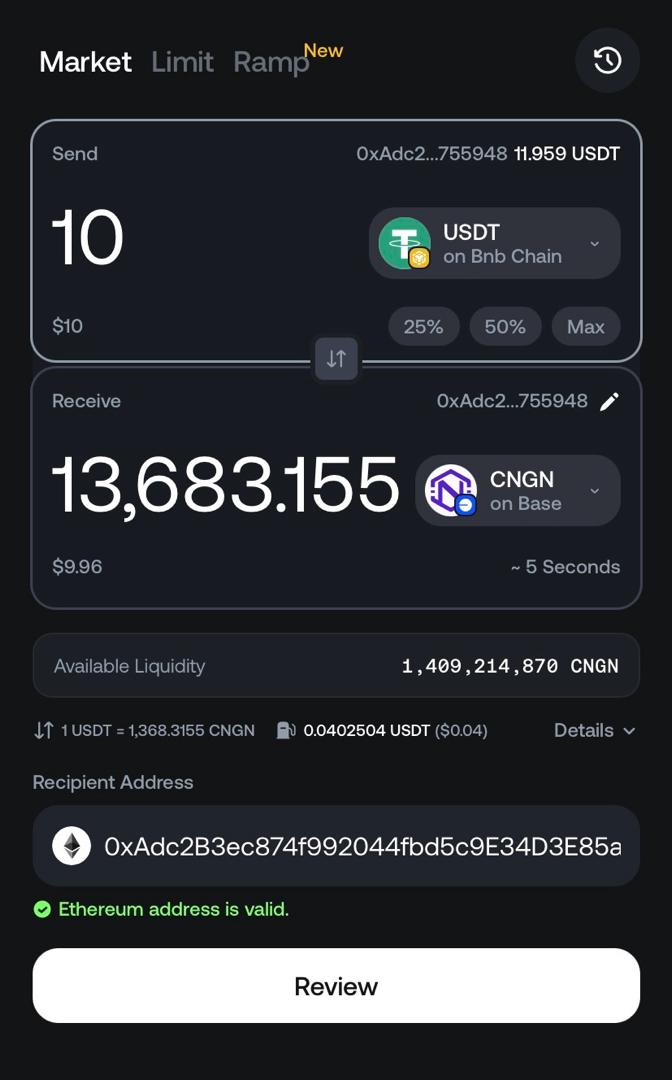
Check the recipient address. The address defaults to your connected wallet, but you can change it if you want the funds sent somewhere else. Be careful when entering a different address.
Tap Review and check the summary before confirming. It shows the exchange rate, network fee, recipient address, and estimated completion time. Tap Approve and Swap to continue.
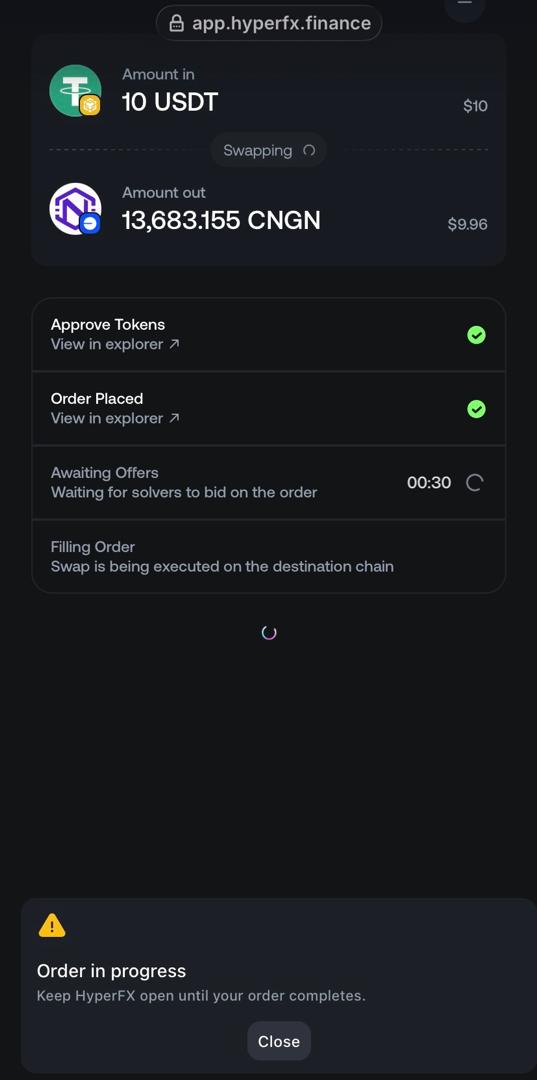
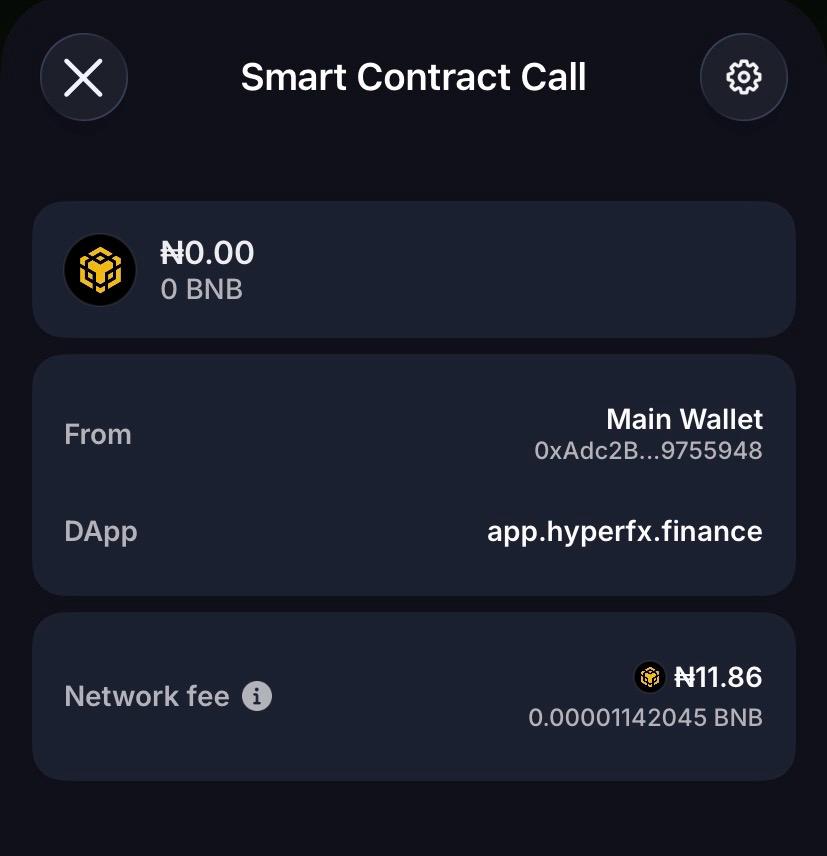
Confirm two separate wallet transactions. The swap requires two transactions rather than one. The first is a token approval, which costs 0.0000070333 BNB in our test. The second place the order and costs 0.00001142045 BNB. Both fees are paid in the native gas token of the source chain and are separate from the amount being swapped.
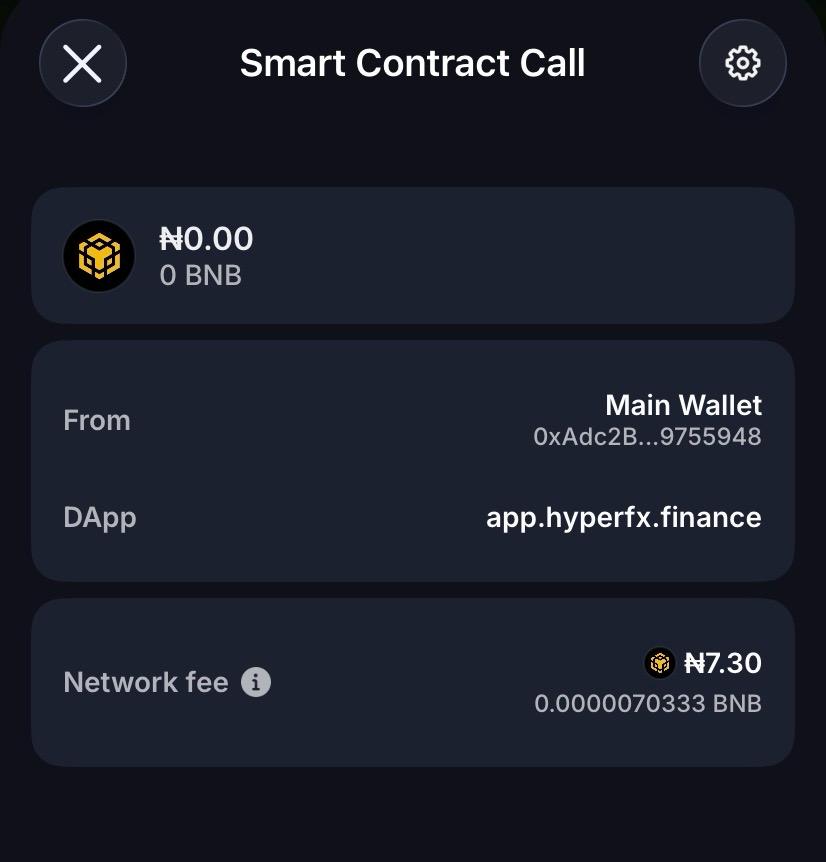
Track the order. After both transactions are confirmed, HyperFX shows four stages: Approve Tokens, Order Placed, Awaiting Offers, and Filling Order. During Awaiting Offers, solvers compete to fill the order. In our test, this stage had a visible 30-second countdown. There is also a longer expiry window in case no solver fills the order, which showed just under five minutes remaining in our test.
Wait for the order to finish filling. Once the Filling Order is complete, the cNGN arrives on the destination chain, which was Base in our test.

From our actual test swap:
- Sent: 10 USDT on BNB Chain
- Rate quoted: 1 USDT = 1,368.3155 cNGN
- Network fee shown in the app: 0.0402504 USDT (about $0.04), deducted from the output rather than charged separately
- Received after the fee: 13,683.155 cNGN. The calculation checks out: the $10 swap value minus the roughly $0.04 fee leaves the $9.96 shown by the app.
- Wallet gas paid separately in BNB: ₦7.30 for the token approval and ₦11.86 for placing the order, for a total of ₦19.16. This gas cost is paid on top of the swap and is not deducted from the USDT being swapped.
Common Mistakes to Avoid
- Don’t approve unlimited spending for a contract you haven’t checked. If your wallet gives you the option to approve an exact amount instead of an unlimited amount, use the exact amount.
- Check which version of the asset you’re receiving. Make sure you’re receiving native USDT or cNGN, rather than a wrapped or bridged version. With a cross-chain swap, the same token name can refer to different assets on different networks.
- Budget for two gas payments, not one. Our test required BNB for both the token approval and the order-placement transaction, before the swap itself was completed.
- Review the quote before signing. Don’t assume the quote is still valid if you leave the page or wait before confirming.
Safety Checklist
- Confirm the source and destination chains. Don’t check only the token names. With HyperFX’s cross-chain design, USDT and cNGN alone don’t tell you which networks are involved.
- Double-check the recipient address. The address is editable and does not have to be the same as your connected wallet.
- Start with a small test amount. This is also how we identified the two separate gas transactions in our test.
- Keep the order tracker open until the swap is complete. The HyperFX interface warns users not to close the window while an order is in progress.
FAQ
How long does a HyperFX swap actually take?
The process can take longer than the “~5 seconds” headline suggests. In our test, the order spent about 30 seconds in the Awaiting Offers stage before moving to Filling Order. The order also had an expiry window of around five minutes. We did not record a final completion time, so we can’t give a reliable total settlement time from this test alone.
What’s the fee?
HyperFX states a flat 0.05% fee, but our $10 test showed a $0.04 network fee, which is higher than 0.05% of the transaction value. The app also required separate BNB gas payments for the approval and order-placement transactions.
The difference means the $0.04 shown in our test should not be treated as the 0.05% HyperFX fee alone. It may include other network or cross-chain costs.
Is HyperFX safe?
There are several things you can verify directly when using it. Liquidity providers retain custody of their assets rather than depositing them into a traditional pooled account. In our test, the swap also involved identifiable on-chain approval and order-placement transactions, with View in explorer links provided by the app.
Those features make the transactions independently verifiable, but they do not by themselves establish that the entire system is risk-free. As with any DeFi application, users should verify the contracts, tokens, networks, and transaction details before signing.
